Serverless Workers on Modal
When a Task Queue needs more Worker capacity, Temporal invokes a deployed Modal function. Each invocation starts a Worker that polls for Tasks and shuts down before the function times out. Modal can reuse the container for a later invocation.
For setup, see Deploy a Serverless Worker on Modal. For Python configuration and defaults, see Serverless Workers on Modal with Python.
Autoscaling
Temporal uses the same event-driven scaling algorithm as AWS Lambda. The Worker Controller Instance (WCI) requests Modal function invocations based on demand on the Task Queue. Modal supplies container capacity for those invocations.
Scale-out
When a Task cannot be matched to an available Worker, the WCI can request a new function invocation. Periodic checks can also trigger an invocation when backlog exceeds the configured threshold. Each scale-out action requests a Worker invocation.
Modal can serve the invocation in an available container or start a new one. For warm capacity and container limits, see Container reuse and capacity. Set Temporal's scaling thresholds with the Modal compute-config commands.
Scale-up pauses for rate-limited Task Queues
If the dispatch rate stays flat while Tasks are waiting, the scaler can pause demand-driven Worker starts. This can
avoid starting Workers that cannot increase throughput on a rate-limited Task Queue.
Worker replacement starts governed by --max-worker-lifetime-ms can still occur. See
Configure scale-up for rate-limited Task Queues.
Scale-in
Worker shutdown and Modal's idle container policy determine when capacity goes away. Each Worker polls until it nears its execution deadline, even if the Task Queue is empty. When the invocation exits, Modal can keep the container ready for a later invocation or remove it.
Container reuse and capacity
Each invocation creates a fresh Client and Worker. A Worker can process Tasks from multiple Workflow Executions during one invocation. If Modal reuses the container, the next invocation initializes a new Worker.
Configure container capacity on the Modal function:
min_containerskeeps a minimum number of containers warm. The Worker starts when Modal invokes the function.buffer_containerskeeps spare container capacity while the function is active.max_containerscaps the number of containers available for invocations.scaledown_windowcontrols how long Modal keeps idle containers during scale-down.
By default, Modal can scale the container pool to zero. Configure Task concurrency in the Temporal Worker and allow one active Modal input per container. See Modal autoscaling.
Sharing a Task Queue with long-lived Workers
Modal Workers can provide extra capacity on a Task Queue served by a fixed-size fleet of long-lived Workers. Temporal starts Modal Workers when the existing Workers cannot keep up and the scaler detects unmet demand. Keep the long-lived fleet at a fixed size so one scaler responds to demand on the shared Task Queue.
Worker Versioning
Worker Versioning uses two identifiers on Modal:
- Temporal Worker Deployment Version. The deployment name and Build ID identify the Worker build and determine Workflow routing.
- Modal App version. The numeric version identifies the deployed code that Modal runs when Temporal invokes the function.
For production, associate each Worker Deployment Version with a specific Modal App version. Set --app-version to that
number when configuring the provider. Omitting the value or using 0 targets the current deployed App version. A
redeploy can then change the function code invoked for an existing Worker Deployment Version.
How the versioning behavior changes rollout
Pinned and Auto-Upgrade control how Workflow Executions move between Temporal Worker Deployment Versions. The Modal App version in the compute configuration determines what code each Worker Deployment Version runs.
| Versioning behavior | With a specific Modal App version | With the current Modal App version |
|---|---|---|
| Pinned | Existing Workflows stay on their assigned Worker Deployment Version and its Modal App version. | Existing Workflows stay on their assigned Worker Deployment Version, but a Modal redeploy can change the code they run. |
| Auto-Upgrade | Existing Workflows can move to the Current Version and its Modal App version on their next Workflow Task. | A Modal redeploy can change the code that an existing Worker Deployment Version invokes before you change the Current Version. |
For setup, see Record the app version.
Lifecycle
Each Modal Worker invocation has three phases:
- Init. The integration creates a Client and Worker and connects to Temporal.
- Work. The Worker polls the Task Queue and processes Tasks.
- Shutdown. The Worker stops polling, gives in-flight Activities time to finish, and runs shutdown hooks.
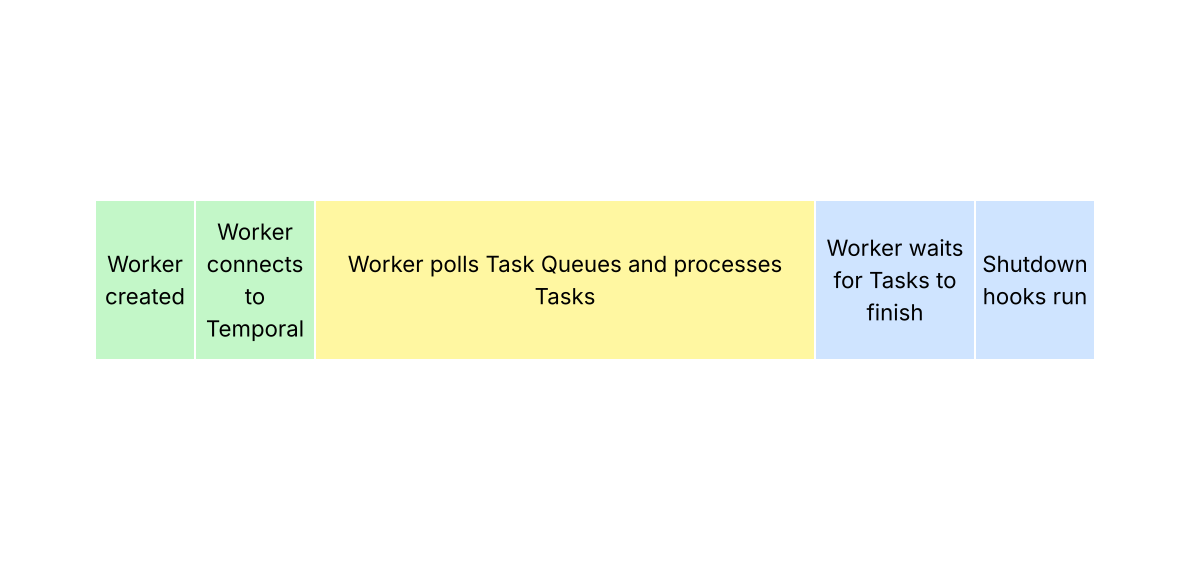
The shutdown deadline buffer gives the Worker time to shut down. The Modal integration also leaves a safety margin before the function timeout.
The Modal integration uses the function timeout you pass to run_worker and sets its default execution deadline
15 seconds earlier. It starts shutting down before that deadline, with time for the configured graceful shutdown
period (five seconds by default) plus two seconds for cleanup. Pass the same timeout to the Modal function and the
integration. See
Python Worker configuration.
Tuning for long-running Activities
Size the graceful shutdown timeout for the longest Activity attempt the Worker needs to finish after polling stops. The default shutdown deadline buffer grows with that timeout. If you set the buffer explicitly, include the graceful shutdown timeout and time for shutdown hooks.
Set the Modal function timeout high enough for connection setup, Activity processing, the shutdown deadline buffer, and the 15-second safety margin. A Workflow Execution can continue on another Worker invocation. For Activities that need to resume after an interruption, record progress with Activity Heartbeats.